Offline and sync status
What it is
A small badge on each file shows where it is, in Finder and in the FIIP DRIVE window. The Tray, in the menu bar, shows what is moving right now.
- Kept offline (a filled dot). Kept on this device on purpose. Only you clear it.
- On this device (a ring). Here because you opened it, so it plays offline for now.
- Online only (a cloud). Not on this device. Opening it downloads it.
- Downloading (a green pie). Coming down now. The pie fills as it goes.
- Uploading (a blue pie). Saved here, not in the cloud yet. Leave this device awake until it clears.
- Could not download (a red triangle). A download stopped short.
- In use (a lock). Someone has it open for writing right now. Wait for it to close before you save over it.
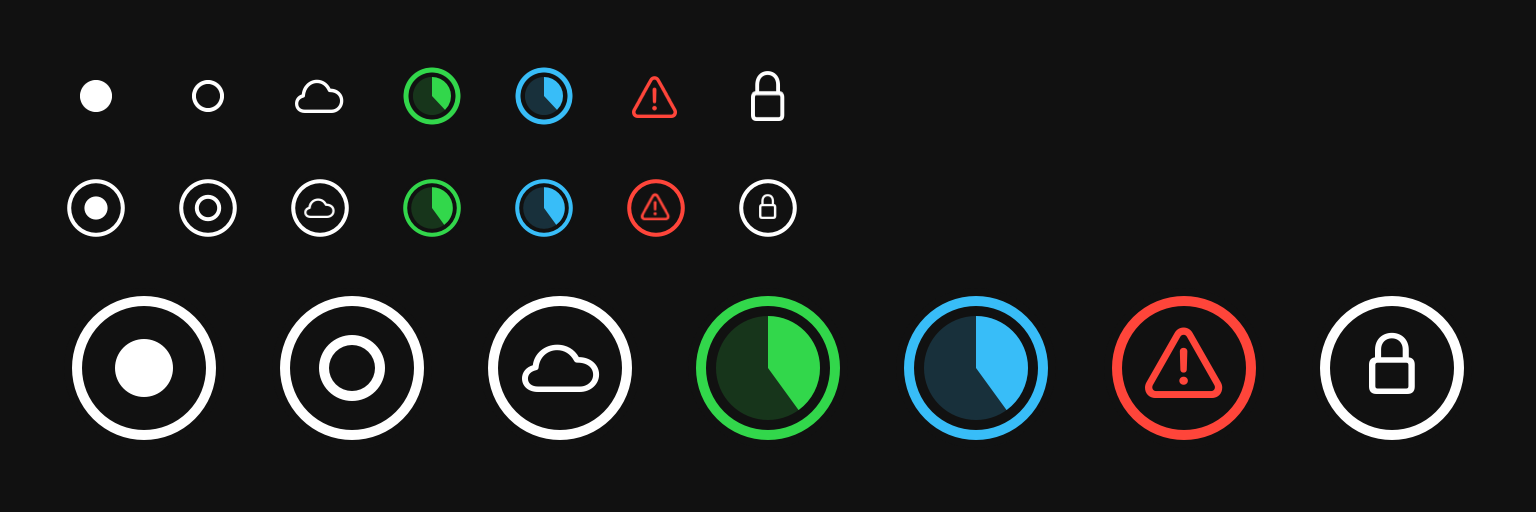
You can see them all any time: open Settings, choose Support, and look under What the badges mean.
How to
- Click FIIP DRIVE in the menu bar to open the Tray, then choose Activity. It lists uploads and downloads. "Nothing uploading or downloading." means you're caught up.
- When you're offline, the Tray shows Offline. Files kept offline or on this device still open. What you save waits as Uploading and goes up by itself when you're back.
- Before you close the lid or leave for the day, check that nothing is still Uploading.
If something goes wrong
- The Tray says "Connecting…". FIIP DRIVE is reaching your drives. It carries on by itself.
- A message is grey. A dropped connection or a sleeping laptop is a wait, not a failure. FIIP DRIVE carries on when it can.
- A message is red. Something needs you, and the message says what to press.
- No badges in Finder. Open Settings, choose General, and press Show me how to turn on the Finder extension.