SMS opt-in
Texts from FIIP are optional. This page shows exactly how a FIIP account holder turns them on. FIIP sends no texts to anyone who has not done this.
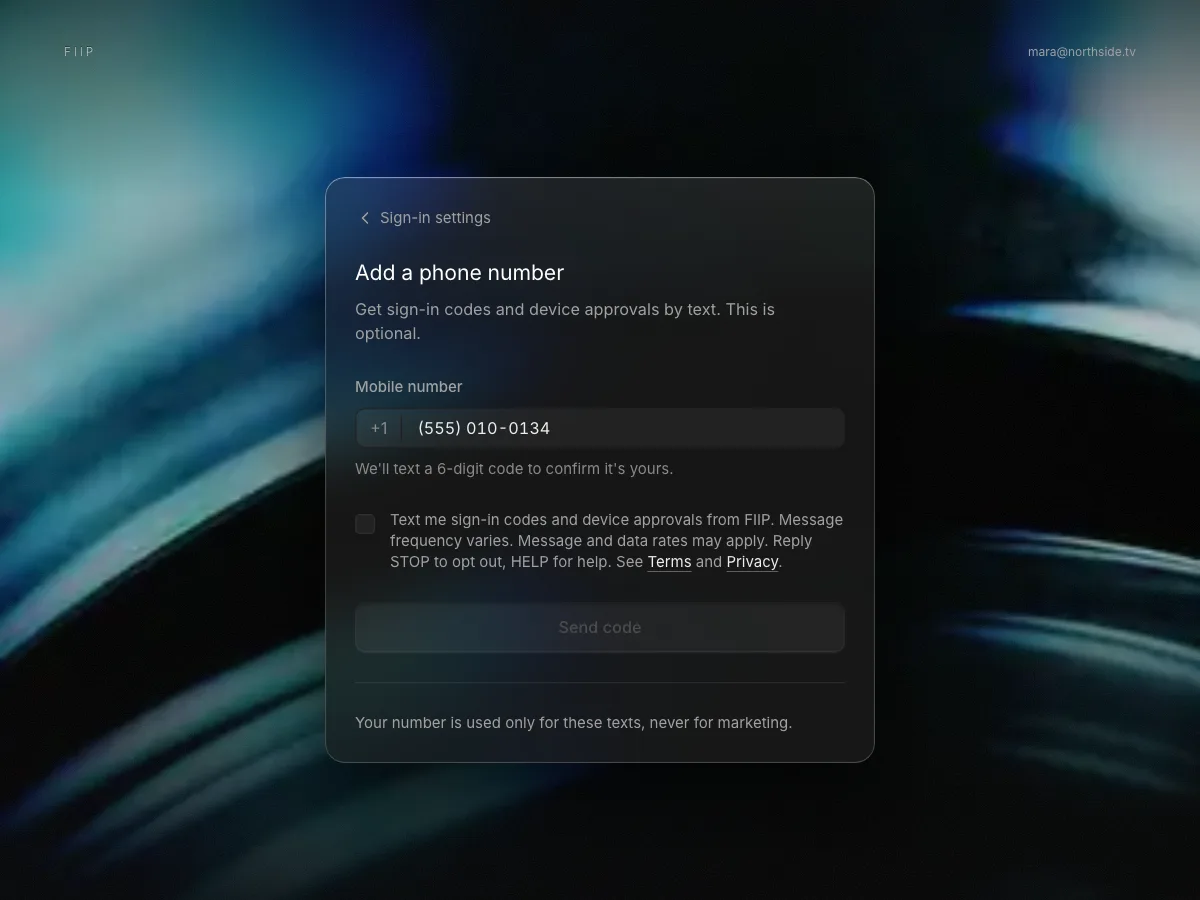
How you opt in
- Sign in to your FIIP account and open Account > Sign-in settings > Add a phone number.
- Enter your mobile number.
- Tick the box, which starts unticked: "Text me sign-in codes and device approvals from FIIP. Message frequency varies. Message and data rates may apply. Reply STOP to opt out, HELP for help. See Terms and Privacy." The Send code button stays off until you tick it.
- We text a 6-digit code to that number: "FIIP: your code to confirm this number is 482913. You'll get sign-in codes and device approvals from FIIP. Msg frequency varies. Msg & data rates may apply. Reply HELP for help, STOP to opt out."
- Enter the code. Only then is the number turned on for texts.
Consent is not a condition of using FIIP, and you can remove your number or reply STOP at any time. We never buy or rent phone numbers, and never text a number that has not been confirmed this way. This screen is not live yet; until it ships, FIIP sends no texts at all.
The program
FIIP account texts, from +1 888-344-7181: one-time sign-in codes and requests to approve a new device. No marketing. Message frequency varies. Message and data rates may apply. Reply HELP for help or STOP to opt out. Full details are in our SMS terms and Privacy Policy.